INTORODUCTION TO NETWORKING
NETWORK DEVICES
TOPIC: NETWORK CARD
REPRESENTED
BY
M.ROSINE
M.HERTIER
NETWORK
DEVICES NETWORKING
NETWORK CARD
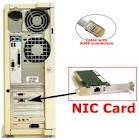
A network card (also called a Network Adapter or Network Interface Card, or NIC for short) acts as the interface between a computer and a network cable. The purpose of the network card is to prepare, send, and control data on the network.
A network card is a component that located in your computer that allows connecting to the internet and peripheral devices and is also known as Ethernet card. There are some other types of network card gigabit Ethernet interface Controller interface, Serial interface, and Multilink Group interface.
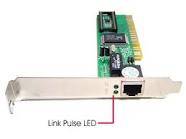
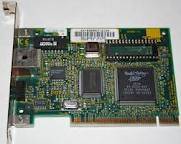
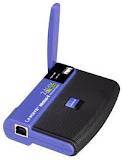
IMAGESOF NETWORK CARD:
HOW NETWORK CARD WORK
The network card have different various forms that work by allowing computer to send out a wireless signals this allow the wireless router to communicate with your computer and accessing to the internet.
These forms are categorized into four (4) as follow:
1. Using computer microprocessor to examine the system being controlled.
2. A programmed (I/O)uses the system address to the bus to create an action
3. An interrupt driven I/O lets the processor know when to send data
4. A DMA allows a component to access the CPM allowing monitoring itself.
Function of network card
A network card is act as the physical interface between the computer and cable. it converts the data sent by the computer into a form which can be used by the network cable, Moreover it transfers that data to another computer and controls the dataflow between the computer and cable. It also translates the data coming from the cable into bytes so that the computer's CPU can read it. This is why a network card is an expansion card inserted into an expansion slot.
Furthermore, network card is responsible for coding and
decoding data and preparing data from the computer to the network cables .this
paths taken by data moving with computer are called “buses” Multiple side-by-side paths force data to move in parallel
and not in series (one after another).in that process the first buses
transported 8bits at a time, IBM’s PC/AT computer introduced the first 16-bit
buses. Today, most buses are 32-bit.
However, data travels on cables in
series (only one channel), moving in only one direction. The computer can send OR receive data, but cannot do both at once. For this reason,
the network card restructures a group of data arriving in parallel into a
serial (1-bit) data stream. To do so, the digital signals are transformed into
electrical or optical signals which can travel over network cables. The device
that translates them is called the transceiver.
In addition, network cards help in
sending data to the other computer but before the sending network card
transmits its data, it interacts electronically with the receiving card to
resolve the issues such as maximum size of data blocks that will be sent, amount
of data to send before confirmation, intervals of time between partial data
transmissions, waiting period before sending confirmation, volume of data that
each card may build up before releasing it to its CPU and data transmission speed ,
If a more recent, advanced card
communicates with a slower one, they still have to share the same transmission
speed. Some cards have circuits for adjusting themselves to the transfer speeds
of a slower card. Both cards must accept and adjust to
the other card's settings before data can be sent and received.
ADVANTAGE OF NETWORK CARD
The network interface card help to
connect the computer which are on network to share one printer instead of buy
it to everyone, and also those card have same important advantage like
potential drawbacks.
One of the drawbacks of network interface cards is that the cards need to be configured in order to work properly with the network; the network interface card needs to be capable of the same speed as the network switch to which it is connected. That means that a network switch running at 100Mb will require the network cards in the computer to be running at the same speed. To make this change, computer technicians will need to adjust the settings on each card to the proper speed.
Network Interface Cards are very
cheap to purchase and install. In addition, many modern computers
already have a network card built in, making it even easier to connect those
computers to the network.
Newer Network Interface Cards can reach speeds of up to 2000 Mbps and I t made a Stable connection between device and cable.
Network interface cards make it easy for computer owners and IT personnel to troubleshoot problems. That is because most network cards have indicator lights built into them. These indicator lights make it easy to see at a glance whether the card is working properly. If you see green flashing lights on the card you know that there is good communication with the network. If those lights are red or amber you know that there is a communication problem.(above image)
Another drawback of standard network interface cards is the fact that they require a hard wired connection. In order to work properly, the computer will need to remain in one place. If you used a wireless adapter instead, you could move the desktop or laptop to different places within the building, provided that the computer remains in range of the wireless router.[1]
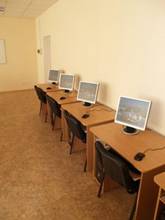
Those are the computer which
Are on network and share one
Printer at the same time.
DISADVANTAGE OF NETWORK CARD
It
needs the proper configuration in order to work correctly with the device .
Network Interface Cards can be unsafe and data is not secured. Replacement need
to be replaced in order to handle better speeds.
END!!
THANKS!
THANKS!